Program it once. Coach every rep.

Spotter.fit is the coaching workspace for trainers who take programming seriously. Build the plan, put it on your clients' calendars and see every set they log. Compare their check-in photos, review their form frame by frame, and let your AI assistant work inside your own account.

Pro features for 14 days, no card needed. Your clients always use the app for free.

app.spotter.fit/trainer/plans/hypertrophy-12w
PlansEdit plan
Hypertrophy · 12 weeks
Upper/lower split, four sessions a week, a deload every fourth week.
ScheduleCalendarWeekly poolEach week lays its days out on fixed weekdays.
Length12 weeks · 66 training days · ~39 h
VolumeQuads 12 · Back 14 · Chest 10 sets a weekAdjust
Clients14 on this planOpen
Library BuildClient view Collapse all
Week 1Volume 6 days · ~3 h 20 · Quads 12 · Back 14 · Chest 10
Day 1~50 min Upper ASteps 8k
Day 2~20 min Mobility flowSleep survey
Day 3~45 min Lower ASteps 8k
Add
Day 5~50 min Upper B
Day 6~30 min ConditioningSteps 8k
Day 7 Check-inWeekly survey
Week 2Volume 6 days · ~3 h 20 · Quads 13 · Back 15 · Chest 11
Week 3Volume 6 days · ~3 h 30 · Quads 14 · Back 16 · Chest 12
v3 live Draft saved 2:32 PM12 weeks · 151 items Discard changes Publish v4
Lower A
Exercise 1 of 50/5 exercises logged
SupersetA
A1 · Back squat
4 × 6-8·@ 80kg·150s rest
SetRepskgLogged
1 8 80
2 8 82.5
3 7 82.5
4 7 82.5

Built for the work, not for the demo

1,900

movements in the catalogue, translated

7

languages, down to exercise names

11 + 12

block and prescription types

114

tools your AI assistant can use

How it works

Build. Assign. Review.

One library, one calendar per client, and an honest record of what happened. Nothing gets retyped and nothing gets guessed.

app.spotter.fit/trainer/plans/hypertrophy-12wapp.spotter.fit/trainer/clients/marta-silva?tab=trainingapp.spotter.fit/trainer/clients/marta-silva?tab=sessions
PlansEdit plan
Hypertrophy · 12 weeks
Upper/lower split, four sessions a week, a deload every fourth week.
ScheduleCalendarWeekly poolEach week lays its days out on fixed weekdays.
Length12 weeks · 66 training days · ~39 h
VolumeQuads 12 · Back 14 · Chest 10 sets a weekAdjust
Clients14 on this planOpen
BuildClient view Collapse all
Week 1Volume6 days · ~3 h 20 · Quads 12 · Back 14 · Chest 10
Day 1~50 minUpper ASteps 8k
Day 2~20 minMobility flowSleep survey
Day 3~45 minLower ASteps 8k
Add
Day 5~50 minUpper B
Day 6~30 minConditioningSteps 8k
Day 7Check-inWeekly survey
Week 2Volume6 days · ~3 h 20 · Quads 13 · Back 15 · Chest 11
Week 3Volume6 days · ~3 h 30 · Quads 14 · Back 16 · Chest 12
Week 4Deload5 days · ~2 h 50 · Quads 8 · Back 9 · Chest 6
Week 5Intensity6 days · ~3 h 30 · Quads 12 · Back 13 · Chest 10
v3 liveDraft saved 2:32 PM12 weeks · 151 items Discard changes Publish v4
ClientsMarta Silva
MSMarta Silvamarta.silva@example.comMessage
Adherence · 28 d86%Down 4 pts on the prior 28 days Sessions12 of 142 missed Last sessionTue, Oct 20Lower A · 52 min1 flag Next sessionFri, Oct 23Mobility flow Last check-inMon, Oct 12Next due Mon, Oct 26
Overview Sessions Habits Surveys Check-ins Muscles Training
CalendarPlans
October 2026 Today Log sessions
27 28 29 30 1Workout~50 min 2 3Workout~45 min 4 5Workout~50 min 6Workout~45 min 7 8Workout~50 min 9 10Workout~45 min 11 12WorkoutCheck-in~50 min 13Workout~45 min 14 15Workout~50 min 16 17Workout~45 min 18 19Workout~50 min 20Workout~45 min 21 22Workout~50 min 23Workout~20 min 24Workout~45 min 25 26Workout~50 min 27Workout~40 min 28 29Workout~50 min 30 31Workout~45 min
ClientsMarta Silva
MSMarta Silvamarta.silva@example.comMessage
Adherence · 28 d86%Down 4 pts on the prior 28 days Sessions12 of 142 missed Last sessionTue, Oct 20Lower A · 52 min1 flag Next sessionFri, Oct 23Mobility flow Last check-inMon, Oct 12Next due Mon, Oct 26
Overview Sessions Habits Surveys Check-ins Muscles Training
Sessions1 of 12 needs your review Needs reviewFlaggedAll
Tue, Oct 20
Needs review1 new comment Lower A Evening · 2 exercises off plan · 1 flag · 1 comment
Logged results · 2 exercisesCollapse on-target

Superset · A

Back squat1/3 off target

Rx3 × 6-8 · @ 80kg · 150s rest

  1. 18 reps · 80 kg—
  2. 28 reps · 95 kg+15 kg
  3. 37 reps · 80 kg—
Romanian deadlift1 flag1/3 off target

Pain

Rx3 × 10 · @ 70kg · 90s rest · RPE 7

  1. 110 reps · 70 kg · RPE 7—
  2. 210 reps · 70 kg · RPE 7—
  3. 38 reps · 70 kg · RPE 6−2 reps−1 RPE
1 commentClient · Oct 20, 6:52 PM · Felt it in the lower back on the last set Reply in general chat
Not reviewed yetMark as reviewed
Mon, Oct 19
Upper AMorning · Everything as prescribed · 6 exercises · 48 min
  1. Build the plan once

    Every exercise lives in your library, on top of a catalogue of about 1,900 movements. Combine them into workouts and multi-week plans. Each plan keeps its own copy of every exercise, and every save is a numbered version. So editing your library never changes a week a client is already following.

  2. Put it on their calendar

    Pick a plan, one client or twenty, and a start date. Every day lands on their calendar. Change one day for one person without touching the plan, or publish a new version and move everyone who follows it when you are ready.

  3. See what actually happened

    Clients log set by set. You read the session the way you wrote it, with every deviation marked: +15 kg, −2 reps, a pain flag, a comment on the third exercise. Mark it reviewed or reply in one tap.

Library & workouts

Workouts that say exactly what you mean.

Eleven block types: straight sets, supersets, giant sets, circuits, EMOM, AMRAP and for time, plus warm-up, cool-down, stretching and cardio sections. Twelve ways to prescribe, from reps, ranges, load in kg, lb, %1RM or bodyweight, rest, tempo and RPE, to distance, duration and intervals for cardio, to mobility, yoga and plyometrics. Start from about 1,900 translated movements, clone them into your library, or import your own from a spreadsheet.

Can I bring my own exercises?

Yes. Download the Excel template, fill it in (up to 200 rows per file, in any of the seven languages) and upload it. Every row is checked before anything is created. One error and nothing is imported, so your library never ends up half-updated.

Do I have to use the Spotter.fit catalogue?

No. Think of it as a starting point you clone from. Your library is yours: your names, your steps, your videos. Catalogue movements you never clone stay out of your way.

Can I add my own demo videos?

On Pro, yes: up to 20 labelled clips per exercise, split by male and female demonstrators if you like, transcoded for every device. On Starter you can link external videos and use the catalogue's.

app.spotter.fit/trainer/workouts/1c9e4a7b
+ Category+ Goal+ Duration+ Description+ Tags
rounds
2 exercises
Hip 90/90
2 reps · Hold 30s
Goblet squat

Drop an exercise hereOr tap to choose an exercise

2 exercises
Back squat
Romanian deadlift

Drop an exercise hereOr tap to choose an exercise

2 exercises
Kettlebell swing
Row
250 m

Drop an exercise hereOr tap to choose an exercise

Drop a block type or an exercise hereOr tap to choose — an exercise creates a Single block

3 blocks · 6 exercises · ~45 min
12 prescription types
  • Strength · reps
  • Strength · time
  • Cardio · distance
  • Cardio · duration
  • Cardio · intervals
  • Stretch
  • Mobility
  • Yoga · pose
  • Yoga · flow
  • Plyometric
  • Bodyweight · reps
  • Bodyweight · AMRAP
Plans & versions

Change a plan without breaking anyone's week.

Every save is a numbered version with a diff. Publish, then move the clients already on the plan to the new version when you choose: all of them, one of them, or nobody. Weekly pool plans give a client "Day 1, 2, 3" to place wherever life allows, and recurring items put a habit or a mobility session on the calendar every few days.

What happens to clients already on a plan when I edit it?

Nothing, until you publish. Even then, nobody moves until you say so. Update all of them, one of them, or leave them on the version they started. An update rewrites a client's upcoming days, so the app warns you first if you had customised any.

What is a weekly pool plan?

Instead of fixed weekdays, each week has Day 1 to Day 7. Your client drops each day onto a date that works. Miss Tuesday and nothing is overdue: the day is still waiting until the week ends, with a grace of up to seven days after it.

Can an item repeat?

Yes. Any workout, habit, check-in or survey can repeat every few days, on chosen weekdays every few weeks, or monthly, with a start and end date and a skip-once.

app.spotter.fit/trainer/plans/8d2f61c0

What clients read about this plan.

Schedule
CalendarWeekly pool

Each week is a list of days; the client picks which date to do each one on.

Length

12 weeks · 48 training days · ~36 h

Clients

14 on this plan

v3 live

Draft saved 2:32 PM

12 weeks · 41 items

This week

1 of 4 done · ends Sat, Oct 24
Day 1Done
Still open from Oct 11 – Oct 17

Check-ins & Compare

Check-ins you can actually compare.

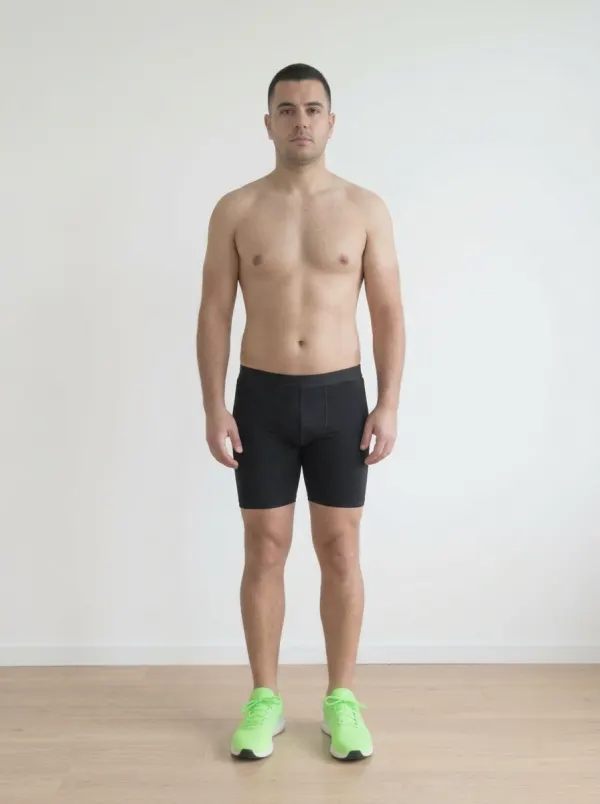
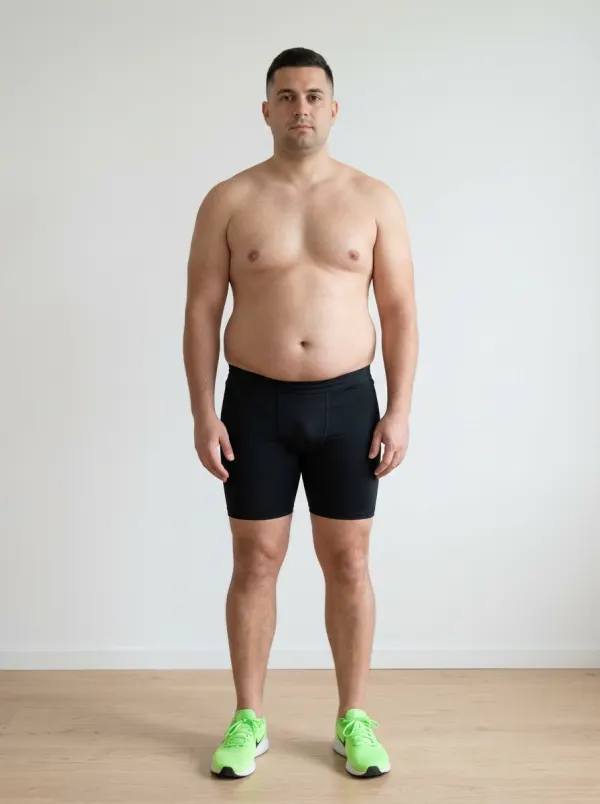
Schedule a check-in like any other calendar item. Your client is guided through up to four poses with your own reference photos, then weight, up to eight body measurements and up to ten custom metrics. Open any two check-ins side by side or under a slider, with the change in every measure right underneath.

What does a check-in collect?

Whatever you configure: poses with your reference shots, weight, body fat, chest, waist, hips, arms, thighs and calves per side, and up to ten typed metrics of your own. You can change the set per client.

Who can see the photos?

The client and the staff of their workspace. Nobody else. Photos sit in a private bucket and every view is a short-lived signed link.

Does Spotter.fit replace my progress-photo app?

For coaching, yes. Photos, measurements and the comparison live where the plan and the sessions live, so you review everything in one place.

app.spotter.fit/trainer/clients/tiago-fernandes/check-ins/oct-12?mode=compare

Monday, October 12, 2026

3 of 3Reviewed by you

This check-in Compare
Compare with
Front, Sep 14, 2026
Sep 14, 2026
Front, Oct 12, 2026
Oct 12, 2026
MeasureSep 14, 2026Oct 12, 2026Change
Weight86.2 kg80.1 kg−6.1 kg
Body fat22 %17.8 %−4.2 %
Waist94 cm86 cm−8 cm
Hips101 cm97 cm−4 cm
Arms (left)36 cm37 cm+1 cm
Thighs (right)60 cm58 cm−2 cm
Video review · Pro

Review form frame by frame.

A client attaches up to two 30-second clips to any exercise while logging. You open them in a review theatre: step through one frame at a time, slow down to half or quarter speed, draw lines, arrows, circles and an angle with a live degree readout. Save the frames you marked and post them into the session's thread.

How does a client send a video?

From the workout, on the exercise they are logging. Record or pick a clip, trim it to 30 seconds, done. It arrives in the session you already review.

How long are videos kept?

Form videos and the frames you save are deleted 90 days after upload.

Can I annotate on my phone?

Playback and the saved frames work everywhere. The drawing tools are on the web app.

Video review

Back squat · João Costa · Tue, Oct 20

1 mark not saved
Tap the first point
0:01.4 / 0:08.1
Frames
1 / 12
0:02.2
Review note
1 frame attached

Save the frame to keep these marks.

Posted as a comment on this session

Messages · Pro

One thread per client, shared by your team.

Every client has one conversation with their coaching team. Attach a session so the message sits next to the sets it is about, quote a line to reply to it, and let the whole team see what was said. Shown here the way your client sees it.

Is there a group chat?

No, and that is on purpose. One thread per client keeps coaching private. Announcements reach everyone at once.

Who on my team sees a conversation?

Every staff member of the workspace. A client sees only their own thread.

Can an automation write to a client?

Yes. Workflow messages are marked "Automated" with your workspace's name, so nobody mistakes them for you.

app.spotter.fit/client/messages?thread=coach

Messages

  • Oct20 Lower AOct 20Rui Costa: Hips and knees track well; the bar drifts forward out of the hole. 1 new comment
  • Oct17 Upper AOct 17Rui Costa: Nice, +2.5 kg next time.
  • Oct15 Lower BOct 15You: Knee felt better after the warm-up.

General chat

  • Yesterday
  • Oct20

    Lower A

    Tuesday, October 20, 2026

    View session

    Last set felt heavy, can you check my squat?6:42 PMRead

  • Rui Costa

    In reply to you Last set felt heavy, can you check my squat?

    Looked at set 3. Knees are fine, the bar drifted forward. Dropping you to 5×5 at 75 kg next week.7:05 PM

  • Today
  • Spotter Gym

    Automated

    Your check-in is due tomorrow. Two minutes, phone in hand.7:00 AM

Workflows · Pro

Automations that wait for the right moment.

Pick a trigger, like a missed check-in, a plan ending, a client who has been quiet for five days, or a new member. Then chain up to ten steps: wait, message, assign a plan, add a goal or a note, notify staff, or stop and ask for your approval. Start from six recipes or from scratch.

Can a workflow do something I have not approved?

Only what you put in it. Add an "Ask for approval" step and the run pauses in your Feed until you say go.

What can start one?

Twenty-one triggers: someone joins, a check-in is missed or submitted, a session is completed or flagged, a goal is reached, a plan is ending, a client has been quiet, a weekly tick, a birthday, a payment issue, and more.

Does it run as me?

It runs as the workspace, per client, and messages it sends are marked "Automated".

app.spotter.fit/workspace/workflows/missed-check-in-nudge

Missed check-in nudge

Runs Run for client…
Settings

Any staff member can rename, pause or delete a workflow.

Name
On

While it's off, nothing new starts and waiting runs hold.

Trigger and steps

The steps run top to bottom for one client, as the workspace.

At the triggerDay 0
Day 1
Run completes

Delete workflow

Runs in progress are canceled. Finished runs stay in the log until they expire.

Delete workflow
Insights

Decision support, not autopilot.

A daily analysis looks at every client's logged sets and flags what deserves your eye: a session that does not fit their pattern, an estimated 1RM that has stopped moving, a rising risk of going quiet. A muscle heat map shows where the last four weeks of work went. Nothing changes a plan by itself. You do.

What does the analysis look at?

Logged sets, adherence and check-in cadence, per client. It looks for anomalies, a 30-day risk of going quiet, strength trends on the weekly estimated 1RM, and which group of clients someone trains like.

Does it change anything by itself?

Never. It is decision support for staff. The queue shows you a row, and what happens next is up to you.

Does it see my clients' names?

No. The analysis works on IDs and numbers. Names are joined back only on your screen.

Muscles
Chest, 6.0 sets per weekObliques, 1.0 sets per weekAbs, 2.0 sets per weekBiceps, 3.0 sets per weekTriceps, 3.3 sets per weekTraps, 2.5 sets per weekDelts, 3.8 sets per weekHip flexors / adductors, 1.5 sets per weekQuads, 7.5 sets per weekTibialis, 0 sets per weekCalves, 1.3 sets per weekForearms, 0.8 sets per week Traps, 2.5 sets per weekRear delts, 1.8 sets per weekLats, 5.5 sets per weekTriceps, 3.3 sets per weekLower back, 2.3 sets per weekForearms, 0.8 sets per weekGlutes, 6.8 sets per weekHip flexors / adductors, 1.5 sets per weekHamstrings, 4.5 sets per weekCalves, 1.3 sets per week

Top muscles · sets/wk

  1. Quads7.5
  2. Glutes6.8
  3. Chest6.0
  4. Lats5.5
  5. Hamstrings4.5
  6. Delts3.8

Not trained: 3 muscles

Push : Pull

64 push 52%48% 58 pull

Upper : Lower

118 upper 53%47% 104 lower
0 <1.8 1.8–3.6 3.6–5.4 5.4–7.2 7.2+ Sets/wk
Insights Nightly ML analysis
Client profile Profile 2 of 4
Sessions/weekAvg volume (kg)Avg duration (min)Completion rateGap regularity (days)Volume trend (%/wk)
1.44,82041.562%4.8-0.6%
3.112,45058.288%2.3+1.2%
4.618,93066.793%1.6+2.1%
2.27,3104974%3.4+0.3%

Churn risk

9% risk of dropping out within 30 days

  • Tenure (days): 214
  • Avg duration (28d): 52.5
  • Sessions (28d): 11
  • Days since last session: 4

Trends

Recent anomalies

Decision support only. Computed nightly from logged sessions; the trainer decides.

Your AI, inside your account · Pro

Ask your AI to do the work. As you, with your permissions.

Connect Claude, ChatGPT, Gemini, Grok, Muse or Perplexity to your Spotter.fit account. It can read your calendar, draft next month's plan, check who missed a session or log the one you just coached, through 114 tools that run under your own permissions and never more. Billing, deleting the account or the workspace, and managing members stay out of reach, and you can disconnect an app in one click.

Which AI apps work?

Claude, ChatGPT, Gemini, Grok, Muse and Perplexity, and any other app that speaks MCP with OAuth. Add Spotter.fit as a connector, sign in with your own account, done. Claude Code and other command-line tools connect through a local callback.

What can it do, and what can it not do?

Whatever you can do in the app: calendar, library, plans and versions, assignments, comments, messages, flags, goals, notes, check-in numbers, surveys, habits, announcements and invites. Not billing, not deleting the account or the workspace, not admin settings, not member management. A client's assistant cannot author plans.

Can I cut it off?

Account, then Connected apps, lists every connection with its last use. Disconnect revokes it immediately.

Claude · connected to Spotter.fit

Who missed a session this week? Draft a deload week for Marta from her current plan.

Used 3 tools
  • get_roster_adherence
  • get_plan
  • save_plan_draft

Two clients missed a session this week: João (Thu) and Inês (Sat). I saved a deload draft of Hypertrophy · 12 weeks for Marta: week 9 at −35% volume, same exercises. It stays a draft until you publish it.

Runs as you · your permissions · no billing, no account or workspace deletion, no member management

And the rest of the job

Your whole team

Admins, trainers and clients, each with what their role allows. Invite by email, ten at a time. Staff can be coached too.

Seven languages, for real

English, Spanish, German, French, Italian, Portuguese (Portugal and Brazil). Everyone picks their own, down to the exercise names.

Barbell squat

Spotter.fit Strength Intermediate Push Compound
Primary muscles
QuadsGlute max
Secondary muscles
HamstringsAdductors
Tertiary muscles
AbsLower back
Grips
Overhand
Equipment
Barbell
How to perform
  1. 1Set the bar across your upper back and grip it just outside your shoulders.
  2. 2Unrack it, take two steps back and stand with your feet shoulder-width apart, toes slightly out.
  3. 3Brace your core and take a deep breath before each rep.
  4. 4Sit down between your heels until your hips reach knee height, knees tracking over your toes.
  5. 5Drive up through your whole foot and breathe out at the top.
Tips & tricks

Keep the bar stacked over mid-foot from start to finish. Chest up, heels down: don’t let your knees cave in.

Habits, surveys and goals

Forty-four habit presets, surveys with six question types whose answers stay readable forever, and goals your client watches you close.

Train in person too

Log the session for a client right on the gym floor. It is marked "Recorded by coach" and needs their opt-in, so the history stays honest.

iPhone, Android and the web

For clients and coaches alike. The mobile app carries the full plan builder, not a read-only mirror.

Privacy by construction

  • Hosted in the EU.
  • Health data only with explicit consent.
  • Self-service deletion with a 7-day grace.
  • Backups never reach back more than 35 days.
  • We do not sell personal data.
Pricing

Two plans. Nothing is an add-on.

Priced per workspace, not per client. Your clients never pay.

Launch offer · 50% off your first year

Starter

€125 first year

then €250 /year

Up to 50 members

  • Library on the full catalogue, Excel import
  • Workouts, versioned plans, pool plans, recurring items
  • Calendars, set-by-set logs, flags, comments
  • Check-ins with Compare, habits, surveys, goals, notes
  • Team roles, seven languages, Insights
Start free

Pro

Most complete

€250 first year

then €500 /year

Up to 100 members

Everything in Starter, plus:

  • Your AI, inside your account (MCP)
  • Your own exercise videos
  • Video review
  • Direct messages
  • Automations
Start free

Brazil: Starter R$99.90 a month or R$999 a year, Pro R$199.90 a month or R$1,999 a year, charged in reais. For a Brazilian billing address with a CPF or CNPJ, paid with a Brazilian card.

Final prices in euros (in reais in Brazil); no VAT is charged. 14-day trial of Pro, no card needed. Cancel any time. Pay by card, Link, Apple Pay or Google Pay.

Compare plans

FeatureStarterPro
Library
Catalogue of about 1,900 translated movementsIncludedIncluded
Your own exercises, Excel import (200 rows per file)IncludedIncluded
External and catalogue demo videosIncludedIncluded
Your own demo videos, up to 20 per exerciseNot includedIncluded
Plans
Workouts: 11 block types, 12 prescription typesIncludedIncluded
Multi-week plans with numbered versions and a diffIncludedIncluded
Move clients to a new version when you chooseIncludedIncluded
Weekly pool plansIncludedIncluded
Recurring itemsIncludedIncluded
Clients
A calendar per clientIncludedIncluded
Set-by-set logs, flags and commentsIncludedIncluded
Coach-recorded sessions, with the client's opt-inIncludedIncluded
Habits, surveys, goals and private notesIncludedIncluded
Insights and the muscle heat mapIncludedIncluded
Check-ins
Guided photo check-ins with your reference shotsIncludedIncluded
Weight, eight measurements, ten custom metricsIncludedIncluded
Compare side by side or under a sliderIncludedIncluded
Team
Admin, trainer and client rolesIncludedIncluded
Seven languages, per personIncludedIncluded
Web, iPhone and Android appsIncludedIncluded
Communication
Announcements to every memberIncludedIncluded
Direct messages, one thread per clientNot includedIncluded
Pro tools
Your AI, inside your account (MCP, 114 tools)Not includedIncluded
Video review, frame by frameNot includedIncluded
Automations: 21 triggers, six recipesNot includedIncluded
Limits
Members (clients, staff and open invitations)50100
Form videos per exercise, 30 s eachNot included2
Free trial14 days of Pro14 days of Pro

Pricing FAQ

What counts as a member?

Every active person in the workspace, clients and staff alike, plus any invitation that is still open. Starter 50, Pro 100. Suspended or departed members do not count.

Do my clients pay anything?

No. You pay for the workspace; your clients use the apps for free.

How does the trial work?

Fourteen days of Pro with up to 100 members, no card. Need a few more days? Extend once by seven. When it ends you choose a plan, or stay on a free, read-only 50-member workspace.

Can I switch plans?

Any time. Upgrades apply at once with a prorated charge; downgrades at the end of the period.

What happens to Pro content if I downgrade?

Your own exercise videos, form videos and direct messages are kept for 15 days after the downgrade, then removed. Everything else stays.

Do you charge VAT?

No. We are exempt under article 53 of the Portuguese VAT Code, so the price you see is the price you pay. Every charge gets a certified Portuguese invoice in euros that states the exemption.

Can I pay in my own currency?

Prices are in euros, and your bank converts the charge to your currency. Brazil is the exception: with a Brazilian billing address, a CPF or CNPJ and a Brazilian card, you pay the prices in reais shown above.

Is there a contract?

No. Monthly or annual, and you can cancel from Billing at any time.

Need more than 100 members?

Write to us. Larger workspaces are set up by hand for now.